Check us out on social media!

Showing posts with label blogging. Show all posts

Blogging Tips: Use BeFunky for Easy Pinterest Collages


Most bloggers know that having a Pinterest-ready photo on your blog can make or break your Pinterest success.

Let's start off with the proper Pinterest sizes. Generally, a Pinterest picture should be about 735x1102. It may seem large, but will be automatically resized on Pinterest newsfeeds. Usually, you want the height to be more than the length so it can properly be displayed on Pinterest without losing quality.

Now you need to create a Pinterest collage of recipe, craft, or product roundups. Most people use PicMonkey but to get the proper size collage, you need to sign up for Royale, which you have to pay for.

I needed to create a college for a gift guide I was doing, and if you're anything like me, you really can't afford to pay for something you won't use often. So I decided to search for an online collage maker that had the sizes I need but for free.

That's when I came across BeFunky. BeFunky is an online collage maker where 95% of their layouts are free, especially most of their Pinterest layouts. It's easy to add your images, delete cells, and resize cells. You can also add overlays and patterns.

Under "Greeting Cards", there is a section for social media headers, social media graphics, and even blogger resources. (Some of the areas are free and some aren't.)

Check out this collage I made for the gift guide using BeFunky and PicMonkey:
(You can view the gift guide here.)

Unfortunately, there is a drawback to BeFunky. Adding text isn't exactly easy, and you can't resize it like you can in other image editing programs or websites. Luckily, that can be remedied simply by using PicMonkey, Ribbet, or GIMP.

I suggest that if you don't have a subscription to PicMonkey or Ribbet where you can get all the cool collage layouts that you use BeFunky just for making your collage.

FYI: You can also download BeFunky on Android or Apple phones.

What do you use to create Pinterest collages?
read more "Blogging Tips: Use BeFunky for Easy Pinterest Collages"

Blogging Tip - Feeling burnt out on blogging?

(credit)
Everyone gets burnout on something every know and then, whether it's working out, a certain food, or a favorite TV show. But if blogging is more than a hobby and you get burnout, it could cause not only your earnings to take a dive, but your traffic as well.

Do you know the signs of blogger burnout?

  • Getting up in the morning and dreading signing into your blogging accounts.
  • Putting off important work because "you don't feel like it".
  • Getting annoying with everything related to blogging.
  • You have to push yourself to finish whatever you're working on as quickly as possible so you can get on with your day.
  • You don't do any blogging work for a few days and avoid it at all costs.
If you have any of these signs, you may be close to suffering from total blogger burnout. I know I've had blogger burnout quite a few times as a blogger. A few years ago for about 6 months, everything seemed to be the same with no exciting changes. So after a while, I started thinking "Why bother?". I decided that I would take a few days off. Luckily, my blog wasn't as big as it is today, so I could afford to take a few days off. Well, it turned into a week off, just enjoying family and friends, and reading. 

When I decided to return back to blogging, I had fresher ideas and felt like I could conquer the world with my blog. For me, it was like taking a mini-vacation, and it worked - I no longer felt dread when it came to posting and social media.

So how you avoid blogger burn out and not worry that taking a mini-vacation will hurt your traffic?

Spend a day just focusing on social media. Retweet, share, or repin things you like and your audience might like.

If your blog is associated with your Pinterest account, spend some time (or a lot) on Pinterest.
It may seem like you're just "wasting time" but you could also be gaining new followers and more traffic to your blog.

Take a day off. If you really have nothing planned for a day (besides checking email), take that day and decompress. Go for a walk or spend time with the family.

Schedule posts, social media, and newsletters ahead of time. This will free you up to take care of the ever-flowing inbox or requests.

If you can afford it, hire a virtual assistant. My sister is my unofficial "assistant", helping me when I need it. Having her help certainly takes off a bit of the stress of having to do everything myself. In fact, she's taken some of the pictures I've used on the blog. If you can't afford an assistant, use a calendar app to help you organize what you need to do.

Write up a non-serious post about something silly or funny. Even if you don't publish the post, you've expended that anxiety about not wanting to blog. Plus being silly or laughing to know to make you feel better..

If you still feel burnt out on blogging, take a step back and reevaluate why you're doing it. Sometimes, bloggers, reinvent themselves or their blogs as their lives change. If you feel your life has changed, maybe your blog needs to change as well.

Have you suffered from blogger burn out, and what steps are you taking to avoid it?

read more "Blogging Tip - Feeling burnt out on blogging?"

Blogging How-To: Headline Analyzer

Headline Analyzer
(Credit)
Bloggers know that headlines are important. It's what makes the reader think "Hey, this sounds interesting. Let's see what it's about". But there is a big difference between a strong headline and weak one.
A must have for bloggers everywhere!

Let me tell you a little story. I was recently approved to start writing for a geeky website, and I was drafting my first article when I realized that I needed to come up with a headline. I really had no clue what I wanted it to be. I knew I wanted to convey what the article was about while enticing readers to check it out. I had 2 title ideas, and I knew one of them was horrible but I was second-guessing myself. I knew I needed opinions, so I asked in the group just for the website writers what they thought. While most of them liked the second title better, one member posted a website where you can have your prospective headlines analyzed - for FREE!

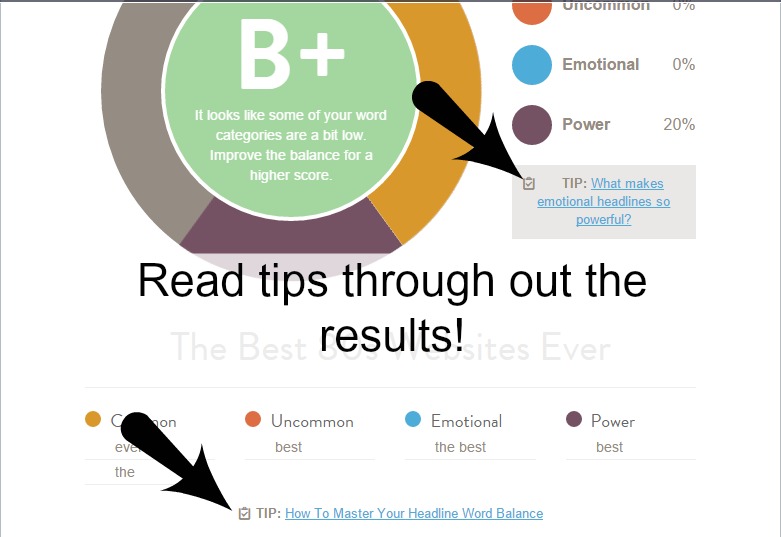
CoSchedule, the marketing and content calendar (think HootSuite but for a price), offers a headline analyzer for free. By analyzing your headline, it will give you a score, word balance (sentence structure, grammar, etc.), and will even show a Google search preview.

While you read the results, you will notice links through out, giving you tips to get the perfect headline that will end up in more traffic and shares. (Seriously, they are GREAT tips!)

If you have trouble coming up with a amazing headline, I suggest using CoSchedule's Headline Analyzer to bounce ideas off of. It will help you come up with headlines of your own, and who knows - it may even become one of your favorites. It's definitely become mine!

Do you use any headline analyzers, and if so, which ones are your favorites?
read more "Blogging How-To: Headline Analyzer"

#spon Power your influence with #Sverve!

This post may contain affiliate links.

How powerful is your influence? Sometimes it's hard to tell, but you can always grow your influence, right?

Sverve is a great platform for social media influencers to build their profile and get noticed by brands, marketers and users. By signing up, you get to specify which areas of influence you want to be endorsed in, what campaigns you want to participate in, and which brands you want to build a relationship with.
Sverve endorsements and score.
A look at scores and endorsements.

You also get to improve your influence score, which is determined by 3 factors: social influence (followers, engagement, etc.), blog influence (your stats), and your Sverve influence (endorsements). What's unique about the Sverve influence is that it is based on what you are endorsed for from followers and users. The more endorsements you get, the higher your Sverve influence.

When applying for campaigns, this influence score is almost always looked at to determine if you would be a good fit for the program. Another deciding fact is your areas of influence - a food blogger is usually not what a home decor campaign is looking for.
Sverve campaigns.
Notice the yellow and orange dots? That helps you keep track of what you're doing!

Speaking of campaigns, that is another wonderful feature of Sverve that I love! Right now, there are 4 different categories for influencers to apply for: Sponsored Posts & Affiliate, YouTube, Pinterest Sweepstakes, and Targeted Tweets. What I love about the campaigns is that you get paid one way or another: through actual payment for each post, tweet, or video you send out or through commission, if you are approved for an affiliate program.

While it isn't a lot, I have made about $15 since I've started Sverve and due to cash out another $5 soon. It's not a big money maker, but well worth the time.

If you are having trouble getting campaigns to sign up for, keep in mind that they only allow you to see campaigns that match your profile so you're not bothered by campaigns that don't suit your blog. For more in-depth information on Sverve, I suggest checking out their Influencer FAQ.

Now, I highly suggest signing up for Sverve because more and more brands are looking at Sverve scores - along with others - to see if bloggers would be a good fit for their programs.

If you do sign up, be sure to follow me and I'll follow you back!

read more "#spon Power your influence with #Sverve!"

Blogging Tip: Do you need a media kit?


If you're a blogger, than most likely you've heard people mention something about a media kit. Essentially, a media kit is like a portfolio and business card rolled into one file. It lets companies, brands, and networks know what you and your blog is all about!

Do you need a media kit? All blogs, unless they're just personal blogs without any sponsorship or reviews, need a media kit. It helps to have your stats in once place, plus it helps you get more clients when it comes to reviews, and all that good stuff.

Where do you begin? Well, all depends if you want to create one yourself, use a template, or pay someone to make one for you. If you want to create one, there is a great tutorial on The Importance of Being Reese (along with some template freebies). If you're unsure on making one yourself (and want someone to create one for you), ask around the blogsphere and see if anyone has a suggestion of a graphic designer that can make one for you. Be sure to keep it simple but cohesive to your blog.

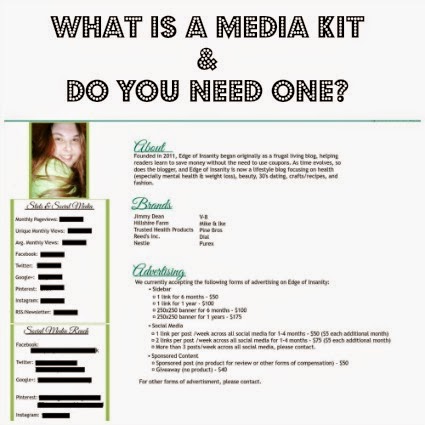
This media kit is used as an example.

Great, now - what do you put in your media kit? There is no cookie-cutter idea of what you need to include but always include your stats, social media, contact information, and a bio (either about you, your blog, or both). You can also include demographics, companies you have worked for, and advertisement rates. As you can see from my media kit, I have included a bio about my blog, brands I've worked with, my advertising rates, demographics, and contact information. (On a side note, I've blocked my contact information and stats, since those are only for prospective brands and networks.)

What if my blog is small and I don't have a lot of traffic?
Believe it or not, to some companies it doesn't if your blog is big or small - passion and dedication are major points over those with a ton of traffic. If you have a lot of influence but a small blog, some companies would rather work with you than a blog with a ton of traffic but not a lot of sway. More often than not, page views won't make or break the opportunity. It all depends on what the brand is looking for.

How often should I update it?
OFTEN! Try for every month or every 3 months. However, if you see that your traffic is changing drastically before it's time to update your media kit, go ahead and update it. You don't want to keep giving out false information only for the company to find out - that could damage your reputation as an ethical blogger.

If you have any questions about a media kit, be sure to leave a comment and I'll try to reply to as many as I can!

Do you have a media kit?


read more "Blogging Tip: Do you need a media kit?"

Blogging: What the new StumbleUpon ban means!


I try to keep abreast on all of the current social media issues, but I have to admit that I had been slipping on StumbleUpon. I don't use it often, and while I know that is blasphemy for a seasoned blogger, I never got much traffic from it even when I did use it regularly.

I was holding a giveaway, and like always, my share buttons were at the bottom of the post so readers could share the post. My buttons included StumbleUpon. A reader pointed out to me that StumbleUpon wasn't accepting any submissions from this blog, so I decided to do a little digging. I found out that it wasn't just my blog that was being banned, but the whole Blogger community! That means if you have a "site.blogspot.xx" blog, you cannot add it to StumbleUpon at the moment.
What Blogger users now see.

While there was no official reason, many have began to think that because Blogger is free with little or no moderation, StumbleUpon is blocking the whole thing to prevent spamming on a higher level. StumbleUpon has also come out and said that you cannot submit your own links, so once again, "site.blogspot.xx" owners are "spamming".  In my opinion, they should moderate - and maybe manually approve - what links are being added instead of banning an entire entity because of the fear of spam.

So what could this mean for your blog if you use Blogger? Well, it all depends on how often you used StumbleUpon and how much traffic you received. If you didn't utilize StumbleUpon a lot or didn't receive much traffic, then you probably won't notice a difference. But if you get a lot of heavy traffic from StumbleUpon and you use Blogger, then you may have to consider using another social media platform that is similar to StumbleUpon. (I suggest Pinterest since I get a huge amount of traffic from it.)

So to recap: If you have a "site.blogspot.xx" blog, any posts, links, images, from there cannot be added to StumbleUpon by anyone because they have decided to ban the Blogger community. No one knows how long this will last, or even if it will ever be lifted.
read more "Blogging: What the new StumbleUpon ban means!"

Blogging - Don't become a mean blogger!

mean blogger

When you first blog, you are very careful about what you say. You want people to feel good about themselves (and your blog) - not offend every person on earth. There are some bloggers, however, that are automatically offensive. But we're not going to talk about those bloggers. They don't need the  promotion. We're going to talk about the bloggers that eventually become mean as their blogs grow.

I am in a blog group where we support each other by sharing our social media links. Recently, I participated in the Pinterest thread where we pin or comment on each other's pins. I posted something very serious (anxiety during bad weather and since a family member suffers from mild to moderate anxiety, it was very near and dear to my heart), and while most of the comments were supportive, there was one person who decided to turn it into a joke by saying something like, "Hide under the covers!". I know I shouldn't take it personally but since anxiety is very personal in my life, I got upset. When you reach out for support and get the exact opposite, you're kind of taken aback.

As I went through the thread, I noticed the same person making snarky remarks on a few other serious pins. As a blogger in a blog group, we are supposed to be supportive in things that matter to us, not make fun of it.

I also saw another blogger had started calling out family members and other blogs on their blog when they don't agree with something, going as far as linking the "offending" blog.

So how can you avoid becoming that "mean" blogger?
  • Don't attack anyone. It's a form of bullying and it looks really bad.
  • If another blogger posts something serious, don't make it into a joke. That post could mean a lot to them. 
  • You can be sarcastic, but not offensive. (Well, unless you're ready for comments that are just as offensive.)
  • Be supportive. Bloggers want support and if you support others, others will support you.
  • Just because you're a popular blog does not give you a free pass to be rude or mean. You'll start attracting bad press and it could ruin your reputation. 
  • If you find something you don't agree with or someone has called you out, don't retaliate. Find out what happened and try to work through it. 
It can be tempting to become of the "mean girls", but it will only work against you and not for you.

Have you ever come across a mean and absolutely rude blogger?


read more "Blogging - Don't become a mean blogger!"

Blogging Monthly To-Do List!

(Photo Credit)

As a blogger, keeping a blog running smoothly isn't an easy feat. There are daily to-do lists and sometimes weekly to-do lists. But sometimes, it is the monthly to-do list that important! I have a set list I usually do at the end of every month.

First off, why is it important to have a monthly to-do list? Aside from being organized, it allows you to see how your stats compare from month to month. It also keeps your blog running smoothly. Some people check the health of their blog at the end of the month (especially if they constantly update their CSS and HTML) but even as a seasoned blogger, I have no idea how to do that! Maybe I should learn soon.

What exactly does my monthly-to list consist of?
  • Export my blog.  I always save it to my two USB drives and Google Drive. You can never be too careful! (Exporting your blog is important should your account get hacked, your hosting goes down, or you have to start over!)
  • Update my blog business plan. For creating your own blog business plan, click here.
  • Update my organizational spreadsheets. I have spreadsheets for reviews, giveaways, earnings, and expenses. It definitely helps me stay organized and on top of things.
  • Export my Google Analytics for that month. I prefer exporting it to a PDF so it's much easier to read. I am not a fan of the Excel or spreadsheet exports. It's hard to read and understand them. 
  • Update my media kit. 
  • Check for broken links. I prefer brokenlinkcheck.com because it shows every broken link, the post URL, the code (SRC), and the nature of the dead link (404, 500, etc.). I suggest using the "Report all occurrences..." option. It might be slower (and may take about 30 minutes or more, depending on the last time you checked your broken links), but it reports every single broken link within your blog.
While it's not an extensive list, it usually takes me at at least a day to get it done - especially if I kind of slacked off in blogging housework during the month. Oops!

read more "Blogging Monthly To-Do List!"

5 Apps Every Blogger Should Have


Blogging on-the-go is now the norm for most bloggers. Some apps (like Instagram) allow us to post pictures of our vacations to our readers within an instant. Some apps help us type out ideas before we forget them. There are even apps that let us edit pictures with the swipe of a finger. But what are the best apps for a blogger to have?

1. An app for your blogging platform
Whether you use Wordpress or Blogger, having an app for your platform allows you to post, approve comments, or edit no matter where you are in the world. Just make sure that your device supports the app.

Wordpress for iPhones/iPads
Blogger for iPhones/iPads
Wordpress for android
Blogger for android

2. Social media apps
This includes Instagram, Twitter, Facebook, and Pinterest. I personally have Instagram, Facebook, and Pinterest on my android tablet. I haven't gotten around to Twitter, but I eventually will.

Since most people already have these, the links aren't needed. But they can be found on either iTunes or Google Play (depending on your device).

3. A photo editing app
Some smartphones or tablets don't have a great editing tool already installed, so you have to download one. Find an editing app that suits your needs. Adobe Photoshop Express is popular, but Photo Editor by Aviary is another great app! (The link for Photo Editor by Aviary goes to Google Play.)

4. Google Analytics
As a blogger, keeping up with Google Analytics is a must! But if you're not going to be near a computer for some time, you might want to consider downloading the Google Analytics app. You can pretty much see everything on there that you normally would.

Google Analytics for android
Google Analytics for iPhones/iPads

5. Evernote or Google Drive
You need a place to upload or keep your ideas and pictures handy. Some android tablets come with Evernote already installed, which makes it hard to uninstall it if you decide to use Google Drive.

For android users, you can search for your apps in Google Play. iPhone/iPad users can search for apps in the iTunes store. Be sure to keep an eye on the price on the app - some of them may not be free - especially the photo editing apps!

Which blogging apps are your favorite?
read more "5 Apps Every Blogger Should Have"

Blogging Trick: Who Likes Your FB Page?


For the longest time, I've been trying to figure out who likes my Facebook page, especially when it comes to verifying giveaway entries. For a long time, Facebook allowed you to see who liked your page, but that is no longer the case.

I discovered a neat little trick somewhere you can see those who like your Facebook page without stressing out. I can't remember exactly where I learned it, but I'll try to find it!

NOTE: Before we get started, you will notice that names and pictures have been blocked out. This is to protect everyone's identity!

Step 1. Type in "people who like PAGENAME".

Step 1. Go to the Facebook homepage, and in the search box, type "people who like PAGENAME". Chance PAGENAME to your page name.


Step 2. Click on See More.

Step 2. You will be taken to a page that shows you, a friend, and the page's posts below. You see see a link that says See More just above you and your friend's information. Click on See More.


You should be taken to a page that lists people who like your page.

Voila! You now have a list of the friends and people who like your page! Unfortunately, there is no way to search for a certain person to see if they like your page. Until Facebook allows that, this is probably the quickest way to search for likes on your page.

This is very helpful for verifying people for giveaways or verifying it for other reasons. But be a responsible blogger - don't abuse it!

read more "Blogging Trick: Who Likes Your FB Page?"

Blogging How-To: Keep your blog organized in 2015!

As bloggers, we strive to keep some sort of organization. There is tons of paperwork, shipping labels, and written drafts everywhere, and trying to reel the mess in is like hanging jello to a wall - it is almost impossible! I am certainly guilty of not keeping my blog stuff organized. But if you're like me, don't fret - there are TONS of ways to keep your blog organized in the new year!

One way to keep everything organized (from reviews to giveaways to earnings and post ideas) is to create a digital "notebook". I use Google Drive to create my spreadsheets, post idea documents, and anything else I need in order to feel a little more organized. In fact, I still have spreadsheets going back to 2012 (just in case).

If you aren't interested in creating all of the documents yourself, there is a wonderful 2015 digital blog planner at Mom's Small Victories!


What if you don't want to keep a digital "notebook"? You don't have to! You can keep an actual notebook. You'll need the follow items:

A large 3-ring binder
Plenty of notebook paper
Pens
A pen/cil pouch for binders
Notebook dividers
A printed (or even handwritten) version of a blog organizer & planner (I found a great printable version at Confessions of a Homeschooler!)

Now you have all of the paper stuff (and digital documents) all organized. Wonderful!

What are other simple ways you can keep your blog and all its stuff organized? Besides a notebook (digital or otherwise), you can always turn your mobile device into a blogging machine! Calendars are great for keeping up with deadlines. Last-minute alerts are my blogging life-saver! There are apps for photos, e-mails, social media, list making, writing notes, and even apps for your blogging platforms! It won't help you with that paper stack of product information, but it can make blogging on the go really easy. Later this year, we'll talk about the best apps that bloggers should have.

Keeping your blog organized doesn't have to be difficult. You just have to remember to do it every day!


read more "Blogging How-To: Keep your blog organized in 2015!"

Blogging How-To: Starting From Scratch

Blogging How-To: Starting From Scratch (After a break.)

A month or so ago, I decided to quit blogging due to personal reasons. I went as far as to get rid of my e-mail subscriber list and Facebook, since I thought I wasn't coming back. Well, I learned that removing some of my blog's social media profiles was a mistake. I now have to start from the bottom and regain the following I once had. So, how does one start from scratch once you have decided to go back to blogging?


  1. Be patient. You won't regain all of your followers overnight. It may takes days, weeks, or even months. 
  2. If you still have some of your blog's social media profiles, let your followers know that you are back and would appreciate it if they joined you!
  3. Ask your fellow bloggers to help you promote your new blog posts. Be sure to reciprocate, promoting their posts as well.
  4. Be persistent. Even the best laid plans can fall apart. But keep trying to gain your readership back. If you need a refresher, feel free to read Gaining Readership from our Blogging 101 course. 
  5. If your family knows you blogged, let them know that you are back to blogging. If you create a Facebook page for your blog, invite them to like your page. 
  6. Be sure to keep it simple for right now. Don't overwhelm yourself with trying to do everything you once did in a day. Not only will you start feeling stressed, you could also wear yourself out trying to do everything. Start slowly and work your way up.
  7. Know that you're not alone. Bloggers take breaks all that time, so they don't feel burned out and when they come back, they usually have to work hard to get their numbers back. 
Starting from the bottom of the blog barrel after a vacation is never easy, but with a little patience (and a small prayer), you can probably get back to normal within a few months!


read more "Blogging How-To: Starting From Scratch"

Blogging How-To: Blogging Safely

Blogging Safely- what you need to know to keep you and your family safe!

When does posting about your family and daily life become too personal? It all depends on what you blog about. Mommy blogs post about mommy problems and kid things, which is normal. I even post about my personal life once in a blue moon, mostly because I am a pretty private person. But I have started notice that before blogging became popular, parents would use initials instead of the child's first name, which is now the case. If the blogger has her last name listed somewhere on the blog, anyone seeing the child's first name and the blogger's last name will now have your child's full name. If put into the wrong hands, things can go down south VERY quickly.

I don't want to scare you, but a fellow blogger had to close her blog because she wanted to keep her family safe. So today, we are going to take a look at ways you can keep you and your family safe while still blogging:

  1. Don't divulge too much information. Refrain from using full first names for children. Use initials or their nicknames.
  2. If you do use your child's full first name, don't put your last name on your blog. Use an initial instead.
  3. NEVER put your address in a public media kit. If you have to, make sure the media kit is password protected or just send it to those who request one. 
  4. Try not to make any enemies in the blogging world. This can be hard, but we never truly know who is behind the blog.
  5. When you talk about certain personal problems, keep the details to a minimum. Don't talk about certain places, unless their widely known, especially if you live in a small town.
  6. Don't take picture of things that could point out full names, addresses, or numbers. If you take a picture of your new car, blur out the license plate number.
  7. Be careful when complaining about a company. If the company believes that you are doing it out of spite, they can legally sue you for defamation. 
  8. NEVER agree to meet a blogger or reader alone. Always use the buddy system and meet in public. Let others know you are going to meet them and keep your phone handy at all times, just in case.
Blogging, while oftentimes fun, can have its dangerous side. While I never had any safety issues while blogging, it does happen and I want all of my fellow bloggers and their families to stay safe!


read more "Blogging How-To: Blogging Safely"

Blogging How-To: Get the Most Out of Pinterest!

I don't know about you, but I spend quite a bit of time on Pinterest. Sometimes I look for crafts I want to eventually create, but I am sometimes looking for blogging tips and tricks I haven't heard of yet. But either way, Pinterest brings me a lot of traffic to my blog for one reason: I create pinnable pictures for my blog posts.

So why is it important that almost every post be Pinterest-worthy? Let's say that someone sees a post they want to pin to Pinterest. If you don't have an image for the post, they most likely won't pin it because then the description of the pin won't make sense or correlate to the picture. In an instant, you have lost potential traffic because unless someone searches specifically for your blog or post topic, no one else (aside from followers) will see your post! We don't want that, now do we?

So step 1 in getting the most out of Pinterest is creating a pinnable image for each post, if possible. Here are a few things you shouldn't do:
  • Avoid creating special images for coupons and deals. Once the deal is over, the post is pretty much over with.
  • Avoid using someone else's images, unless it is for a roundup. If you do use images for a roundup, be sure to give credit. To find images you can use on your blog, visit Slap Dash Mom's blog post on finding free images you can use (as long as a credit is used.)
  • Don't just use any picture for the sake of having one. Make sure it is related to your topic.
Step 2 in creating a Pinterest-worthy image making it look professional and like it belongs on Pinterest. I use PicMonkey and GIMP when I create my images. Use overlays and different fonts to make the image pop. One way to use font is to use a fancy font with a normal font. You can also use tall fonts with short fonts. Use the tall fonts to make the initial statement and the shorter fonts to finish the statement. Same way with the normal and fancy fonts.

Now you have created your fun image and have posted it to your blog, and now we tackle your actual Pinterest account!

A great way to get the most out of Pinterest is signing up for a business account. It is 100% free and it allows you to use their analytics section, so you can see which pins are wins and which pins are flops. Unless you use Chrome or already have it installed on your blog, you can add a Pin It button to your blog so that people can just click on Pin It and they don't have to find a way to pin your blog post.
recipe boards

One major thing to keep followers coming is organizing your boards. As you can see from my boards, I have created board covers with a description of each board. You can create your covers or you don't even have to have one! It was just easier for me and it allows me to organize things a little easier. Speaking of organizing, use a system that makes sense for you. I have my giveaways board first, and then work my ways down the miscellaneous sections like funny pictures and places I want to visit. Group similar boards together like recipes and holidays. Make sure the holidays are in order, so followers are not scrambling to find Easter.

Oh yeah, and one more thing: pin, follow, pin! For every few pins you, er, repin, follow a few of the people you pin from. If they like your pins, they'll follow you as well. Be sure that when you repin that the link actually goes to the recipe/craft/etc. If it just goes to an image or a website that is no way related to the pin, don't repin it.

Pinterest can be your best friend- don't make it your enemy!


read more "Blogging How-To: Get the Most Out of Pinterest!"

5 Quick Tips About Time Management for Bloggers


Believe it or not, time management is a big thing when it comes to blogging. Since you need to do a lot in such a short amount of time, you have to balance everything so you don't feel rushed or end up skipping something important. Ever since I became a full-time blogger, I had to learn how to manage my time efficiently or I probably wouldn't be where I am today. I would probably still be struggling.

My number 1 tip to time management for your blog is to plan everything out... Well, almost everything. There are somethings you cannot plan for, but I suggest you plan your blog posts, promotion, and giveaways. You can either use a calendar app or Google Calendar so you stay organized.

Taking breaks is another important aspect of time management. When you have been in front of a computer so long you can type perfectly in your sleep, it's time to take a break. It will keep you from making costly mistakes.

Don't rush around, trying to finish everything at once. If you have several pictures that need editing, set time aside to edit those pictures. If you have several posts that need drafting, set time aside to draft them. Group like tasks together will help you stay focused.

Do not feel like you have to take on every opportunity that comes your way. You would not believe how many opportunities I turn away just because I simply do not have the time. If you get a pitch for an opportunity but not sure if you can complete by the deadline, don't take it on. Don't spread yourself too thin.

And last but not least...

If you need help, ask for it! You can lose a lot of time just staring at your computer screen, where go to from there. If you're not sure what to go with next or what to start, ask a fellow blogger for a fresh idea. Plus it never hurts to make a new friend! :)

Do you manage your time well or are you the kind that scrambles but somehow gets everything done on time?


read more "5 Quick Tips About Time Management for Bloggers"

Top 5 Social Media Tips


When it comes to blogging, social media is a must. Nowadays, companies and brands want their names or products blasted over Facebook and Twitter. But it isn't as simple as writing about them in 140 characters.  To use social media effectively, you have to time everything and be interactive. Of course, it doesn't stop there. But the following five tips can help you use social media to your advantage, which ever platform you decide to use:

1. Be interactive. There is nothing worse than a cold Facebook page or Twitter profile. It makes your readers wonder if you really care about their opinions or just trying to make money from your blog. I understand that life can get busy and you can't interact like you want to, and that is okay. But be sure to post or maybe reply to a comment to let your readers (and possible brand connections) know that you do care.

2. Timing is everything. Have you ever published a genius post on your blog and when you go to post in on Facebook, nothing happens? It might not have been the best time of the day to publish your content on Facebook. Generally, the best time to post on your Facebook page is between 6am-8am to 2pm-5pm. I personally sometimes have luck posting between 6pm-8pm. On Twitter, the best time to post is 1pm-3pm. To get more repins, the best time to pin on Pinterest is between 2pm-4pm as well as 8pm-11pm.

3. Share, share, share! If you find something that is relevant to your blog or readers, share it! It shows that you are willing to network with other bloggers and help them out. Plus it allows your readers to discover new content.

4. Know your audience. This is pretty much a second part to sharing. Knowing what your audience is and what they want/like/need allows you to better plan your content, thus creating more engagement on your blog. Don't quote me on it, but it could also lead to more shares from your readers and fellow bloggers.

5. Ask questions. It would seem pretty straight forward, right? People love to chime in with their advice or experience about something. You can also get to know your readers more by asking questions about their favorite movie, what they prefer, or even what their plans are for the weekend. This shows you are a real person and not some posting robot.

While these tips may be out of order, the main idea is to be present- just don't post and forget about it. Interact, engage, and really get to know who your audience is and what they really want.


read more "Top 5 Social Media Tips"

Are group giveaways worth it?

Every time you turn around, you see tons of blogs holding the same giveaway for the same prize. But is participating in one truly worth the traffic? Yes and no, but it isn't as complicated as it sounds.

When you participate in a group giveaway, you can gain quite a bit of traffic, but it is only temporary. Once the giveaway ends, you lose that traffic and maybe even some followers on Facebook and Twitter. Some entrants only like a Facebook page or follow someone on Twitter just to get that entry. Unless they truly enjoy your blog, don't expect some of those likes or follows to stay where they are.

When I first started Edge of Insanity, I noticed there weren't a lot of group giveaways. There might be one or two in a blue moon but there prizes had a big value that didn't require bloggers who signed up to pay to participate. It wasn't about incentive either. We just wanted to give our readers the chance to win an awesome prize. But nowadays, everything has been turned into a group giveaway, including prizes with an ARV of $15. If you want to create a group giveaway, make sure the prize is worth the 200 extra entries. Instead of saying, "Yes! Sign me up!', why not contact the company and ask to review the item instead?

Speaking of extra entries, having more than 10 can make the entrant bored. Eventually that entrant will just stop entering those specific giveaways. I hardly ever participate or even enter group giveaways because it just seemed so overwhelming. If I do enter one, I only submit the entries where I know I like a Facebook page or follow someone on Twitter.

Lastly, we turn to how you are viewed as a blogger. If all you do is participate in group giveaways without any strong content, brands who are wanting a long partnership might skip over your blog. Sure, brands want their name noticed over the blogsphere. I am not denying that. But they are usually looking for a well-respected blogger that posts regularly so that their product stands out. Not to mention that continuous group giveaways on your blog is a great way to lose faithful readers. I learned that lesson the hard way.

I haven't done a group giveaway in months because to me, it wasn't worth the time and effort. When I have other giveaways, reviews, and posts to promote, worrying about a group giveaway was usually at the the bottom of the list. I probably won't do group giveaways anymore.

If you want to participate in a group giveaway, that is completely up to you. But for bloggers that are trying to create a blog with quality content and steady following, group giveaways usually are not worth it.

Want a more in-depth look at group giveaways? There is this fascinating post at WiC Project that includes the pros and cons of each type of group giveaway.

read more "Are group giveaways worth it?"